
Charity campaigns require stories that link purpose to real people’s lives. Good videos can convey missions in a short time and help to develop understanding and trust. Pippit assists in the creation of structured ideas into a well-finished campaign video by generating, editing, and exporting. The outcome is reliant on emotional structure, visual continuity, references, and exact scene direction.
Why Storytelling Matters in Charity Campaign Videos
A narrative is more effective than random promotional images in conveying a charity’s mission. The beginning sets the scene, and development indicates change that is meaningful. That change is brought to a purposeful ending that relates to the campaign’s central mission. But visual storytelling can make sense of complex social issues without relying solely on written language. This can be aided by an AI video generator using prompts that specify meaningful scenes and actions. There is never an excuse for emotional impact to be a substitute for accuracy, context, or respectful representation. Don’t stereotype, don’t make people into helpless figures, or dramatic visual symbols. Be factual and do not include outcomes that are not supported.
Build Connected Campaign Stories With Precise Audio Direction
Determine the purpose of the campaign, target audience, main message, characters, setting, and desired audience response. Think of each scene as a visual beat and keep the story continuous from start to finish. SeedAudio 2.0 can enhance these moments by creating dialogue, ambience, sound effects, and music from text, video, and reference audio. It has a time-stamp feature that can be used to set various speech or sound cues at desired points in time. With track-separated output, you have the ability to edit dialogue, ambience, effects, and music separately, which can help charity campaigns control the pacing, clarity, and emotional impact.

Key planning practices include:
- Ensure that each visual beat is about the campaign message.
- Utilize references that support a single creative approach.
- Limit the amount of characters’ actions to be simple and easy to understand.
- Decide on the scenes that need to be connected before creating the final campaign video.
Steps to Generate Charity Campaign Videos Using Seedance 2.5 Impact Storytelling
Step 1: Build Your Impact Story
- Sign up for Pippit using your Google, TikTok, or Facebook account information.
- Open the “More” tab on the left vertical menu bar and select “Video generator”.
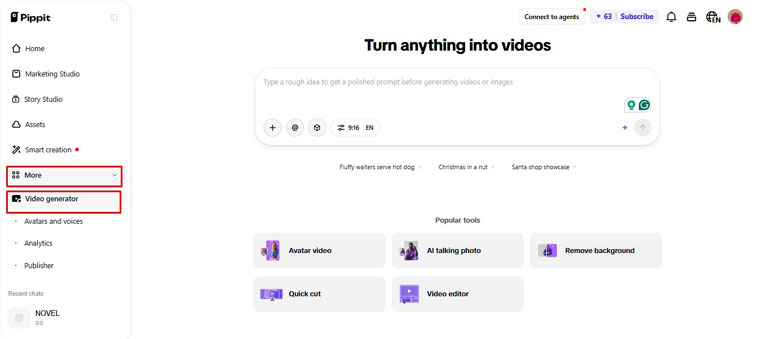
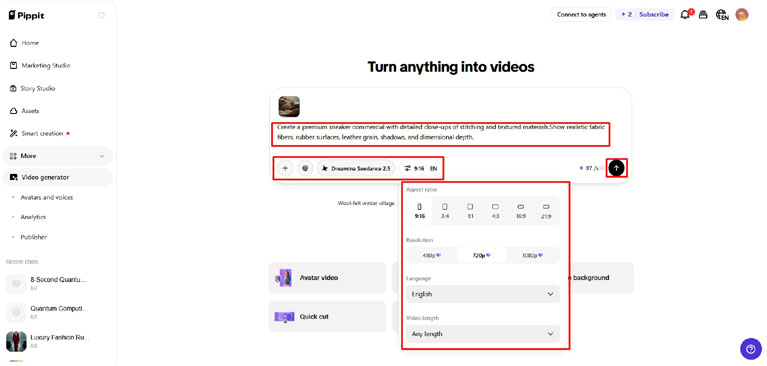
- Choose an AI model such as “Dreamina Seedance 2.5” to create your charity campaign video.
- Enter a detailed text prompt that explains the charity story, people involved, emotional moments, and the impact you want to show.
- Select the video length, language, subtitles, and aspect ratio that fit your campaign.
- Click “+” to upload reference images or videos from your device, phone, Dropbox, or a link. You can also choose assets if you do not have reference media.
- Once your campaign details are ready, click “Generate”.
Step 2: Turn the Story Into a Campaign Video
- After you click “Generate”, Pippit’s AI video generator creates a video from your text prompt and reference media.
- The AI manages elements such as transitions, pacing, captions, avatars, voice, lyrics, and visual enhancements.
- You will receive a video draft that you can review for emotional impact, clarity, and storytelling.
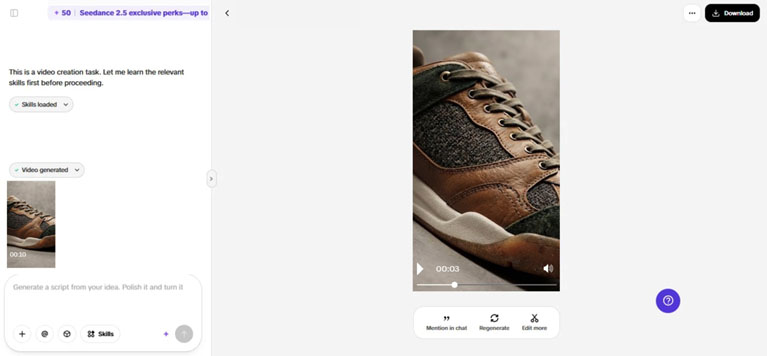
Step 3: Refine and Share the Message
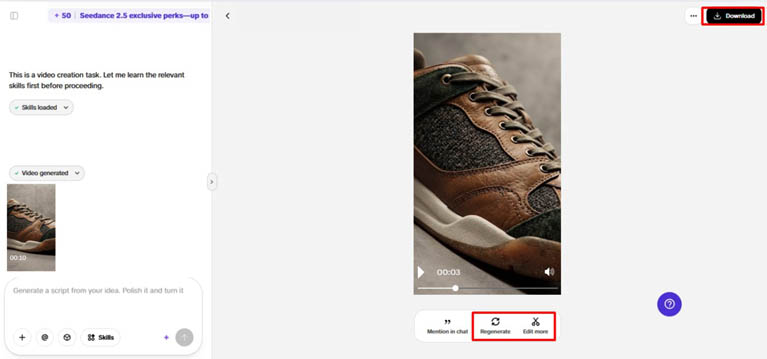
- Click the “Download” tab in the top right corner to save the video as it is. If the result does not fit your campaign, click “Regenerate”. To make further changes, select “Edit more” below the video to open the Pippit editing interface.
- Customize the campaign by editing captions manually, adding text, and changing its size, color, alignment, filters, and effects.
- Add background music, remove backgrounds, and fine-tune the visuals to make the charity message more engaging.
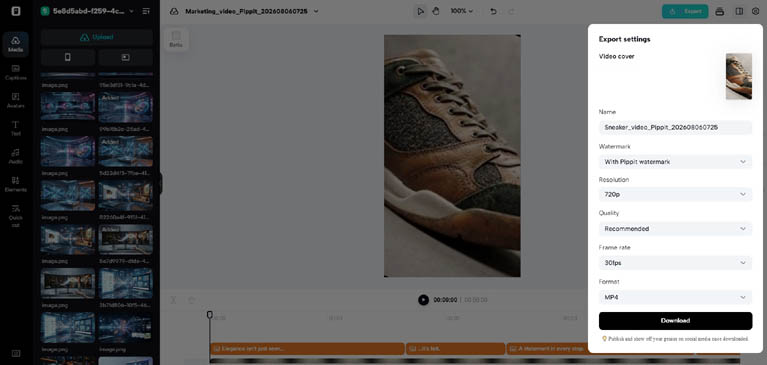
- When the video is ready, click “Export” in the top right corner.
- Select “Publish” to post it directly to TikTok, Instagram, or Facebook, or choose “Download” to save the video in your preferred format, resolution, frame rate, and quality.
Use Spatial Planning for Respectful Social-Impact Visuals
Respectful charity storytelling requires well-made settings, authentic encounters, and intentional visual cues. Use references to create the correct settings, objects, clothing, lighting, and campaign identity, but not stereotypes or emotional props. Seeworld is a more general 3D world-model approach that emphasizes environments, spatial relations, objects, and viewpoints. This can be used in pre-production to help the creator think about how to set up a scene, where characters should be, how big and small objects should be, and what camera angle they should use, before creating the actual footage. Pippit’s 3D Director Studio provides a hands-on approach to considering these spatial planning ideas and creating coherent, dignified campaign graphics.
Adapt One Charity Story Across Different Formats
When the main story is the same, there can be multiple campaign stories. Develop a vertical format for short-form social media and mobile viewing. Create landscape versions of websites, presentations, fundraising pages, or other placements. Make adjustments to subtitles and language for multilingual outreach without altering key claims. Rethink openings when platforms need a quicker introduction or more context. Tweak the ends to fit donation, awareness, registration, or information objectives. Pippit’s editing tools can render variations without the need to rebuild all the visual elements. Ensure that characters, campaign colours, key actions, and central messages are consistent across versions. This way, you don’t have to put in the same work and cater to various audience needs.
Improve Charity Video Quality Through Iterative Generation
The first generation should be used as a review only and not as the outcome. Ensure continuity, pacing, composition, readability, and clarity of message before publishing. Reproduce scenes when a character’s movement, object positioning, or direction of gaze is inconsistent. Make prompts more specific by using action rather than emotion words. Indicate who is moving, what is changing, where the motion is, and when significant moments are occurring. Selectively use references to give Pippit focused creative direction. When references add conflicting visual information, remove those that are not necessary. Check all key frames for factual, visual, and contextual correctness. Before launching the campaign, test the final video on the platform it will be used on. Iteration can help to increase clarity and decrease distracting inconsistencies.
Charity Campaign Visual Planning Checklist
- Determine a measurable campaign objective before creating the visual story.
- Determine the main idea, purpose, audience, characters, and/or setting.
- Use clear visual beats with purposeful transitions in the story.
- Include time code instructions for key actions, reveals, and scene changes.
- Choose citations that support the consistent color(s), environments, objects, and styling.
- Check for accuracy, dignity, continuity, pacing, and clarity of footage.
- Create different aspect ratios, subtitles, language, and endings for different platforms.
- Review all final shots prior to campaign release.
Conclusion
Good charity videos require intentional narratives, misinformation-free visuals, and good creative direction. Structured planning provides each scene with a well-defined function in the campaign story. Short campaign sequences can be made more powerful with connected generation, references, timestamp control, and realistic motion. Pippit is a tool that handles generation, editing, adaptation, and export in one workflow. Strong campaigns do not have to be emotional and aren’t emotional if they are dignified, authentic, and factually responsible.